Skip to content
ORG-APP
Strategy · System · StructureRolesSecurityPricing
Sign inStart free
Strategy · System · StructureRolesSecurityPricingSign inStart free

Strategy — System — Structure

Build a high-performing organization.

One platform that connects your strategy, systems and structure, from head office down to every region, branch and team, however many levels deep you go. You get the visibility, accountability and efficiency to run your organization well.

  1. Head office
  2. ›
  3. Regions
  4. ›
  5. Branches
  6. ›
  7. Teams
  8. ›
  9. as deep as you need
Start freeRequest a demo

Every screen on this page is the real product, showing Meridian Alliance, our made-up demo organization.

org-app.com/dashboard
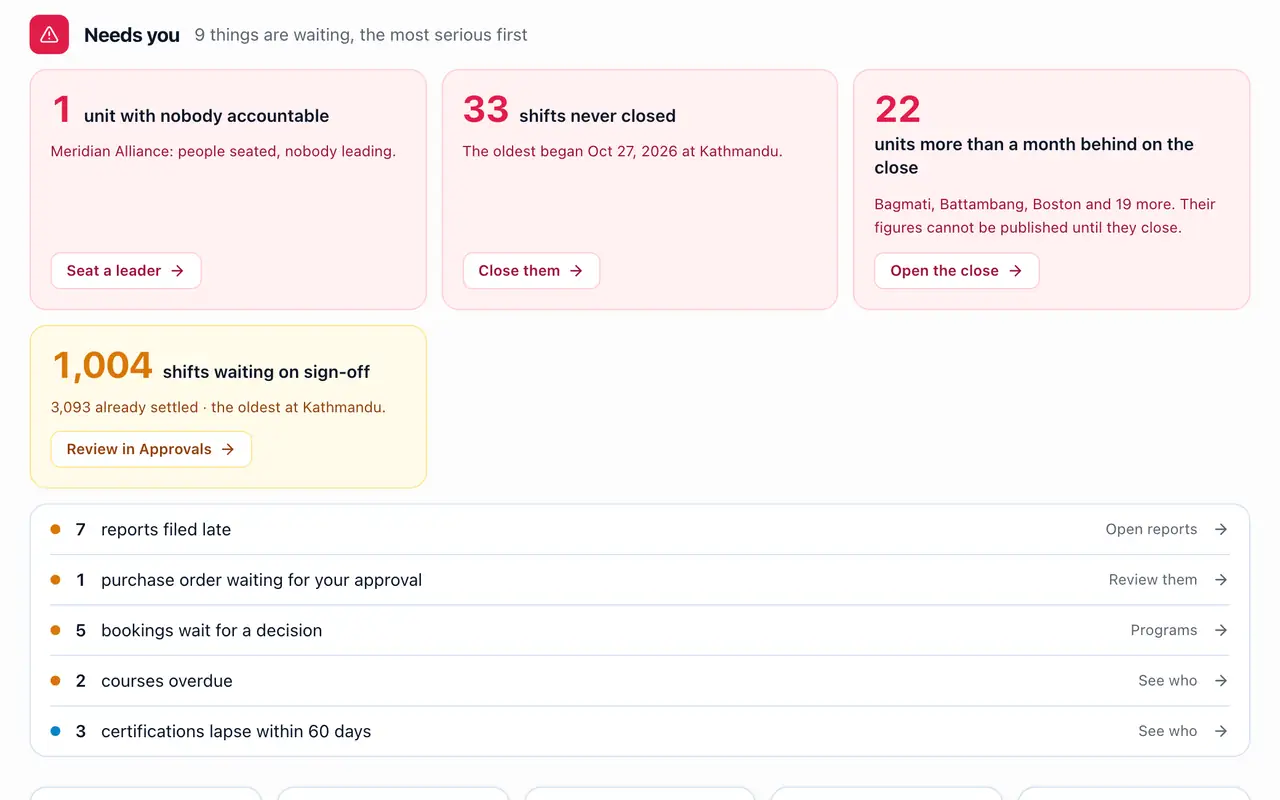
The Owner's dashboard in the Meridian Alliance demo: what needs them, worst first (a unit with nobody accountable, shifts never closed, units behind on their monthly close, shifts waiting on sign-off, a purchase order waiting for approval), and the month's figures
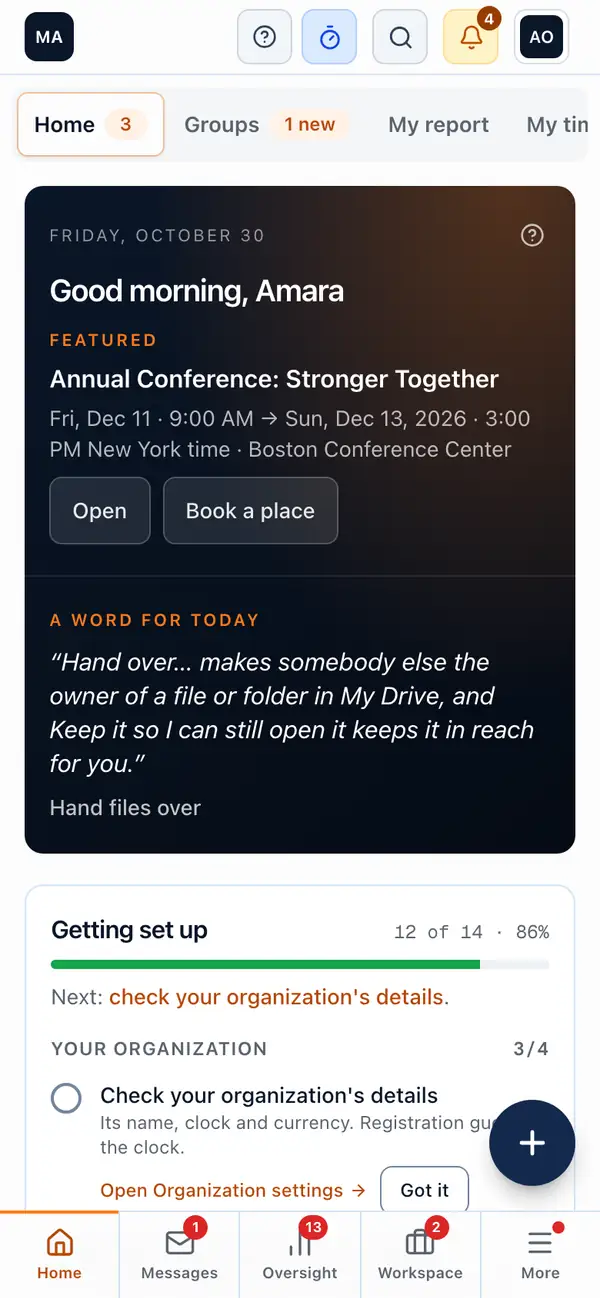
The director's Home on a phone: a greeting, what is coming up and the tabs along the bottom
57
modules, switched on as you grow
Any depth
of units: head office, regions, branches
15 roles
built in, plus your own, set unit by unit
ORG-APP

Software for organizations made of units, from the international office to the local group.

support@org-app.com

Product

  • Pricing
  • Help
  • Partners
  • Sign in

Company

  • About
  • Contact

Legal

  • Legal
  • Privacy
  • Terms
  • Sub-processors
162
currencies, one set of books per unit
Offline
clock-ins and claims on the phone

57 modules, one platform

Everything you need, organized the way high-performing organizations run.

Switch on what you need today and the rest as you grow. Every module shares the same people, units and books, so nothing is typed twice.

1 · Strategy

Where are we going?

And does everyone know it?

  • Boards & governanceStrategic plans, measured goals, decisions and minutes
  • Where we're goingThe Owner or an Admin shares the strategy with everyone, at the top of their Home
  • Home & dashboardWhat needs you, and how the month is going
  • Roll-ups & consolidated reportsFigures added up the tree, unit by unit
  • Staff reports & formsReports on a cycle, signed off up the tree
2 · System

How do we get there?

Efficiency, consistency and visibility, with departments working together.

Time and pay

  • Clock & timesheets
  • Leave
  • Shift rosters
  • Volunteer rotas
  • Attendance
  • ID cards & scanning
  • Pay periods & payroll
  • Pay runs & payslips

Money

  • Finance book & giving
  • Budgets & expenses
  • Invoices & receivables
  • Purchase orders
  • Sales pipeline
  • Levies
  • Membership & dues

Programs and learning

  • Calendar & events
  • Programs & bookings
  • Follow-up
  • Courses & compliance
  • Resources
  • Accommodation
  • Posters

Communication

  • Messages & notifications
  • Noticeboard
  • Broadcasts
  • Monthly sends
  • Texts & WhatsApp
  • Video rooms
  • Teams & groups

Work and connections

  • Tasks & projects
  • Forms & surveys
  • Drive
  • Spreadsheet imports
  • API & webhooks
  • Calendar & accounting sync
  • AI assistant
  • AI connections

Website and control

  • Website
  • More website pages
  • A page for every unit
  • Custom domain
  • Branding
  • Admin tools & audit log

3 · Structure

Who is responsible for what?

Clear roles and accountability, from head office to every team.

People and accountability

  • People & seats
  • Units & hierarchy
  • HR & onboarding
  • Recruitment
  • Performance & engagement
  • Letters & e-signature
  • Disciplinary & grievance cases
  • Custom roles & seat grants
  • Single sign-on & SCIM
  • Organization settings

Roles · 15 built in, plus your own

  • Owner
  • Organization admin
  • IT admin
  • Board member
  • Unit coordinator
  • Unit lead
  • Finance officer
  • HR administrator
  • Safeguarding lead
  • Program manager
  • Project manager
  • Communications
  • Auditor
  • Staff
  • Volunteer

Each role sees and does what its job needs, unit by unit, checked page by page.

The core of running a company

Nine areas every organization runs on. All here, all connected.

A timesheet becomes a payslip and a line in the book. A hire becomes a seat, a checklist and a box on the org chart. Nothing is typed twice.

The core areas

Strategy

System

Structure

org-app.com/governance/plans
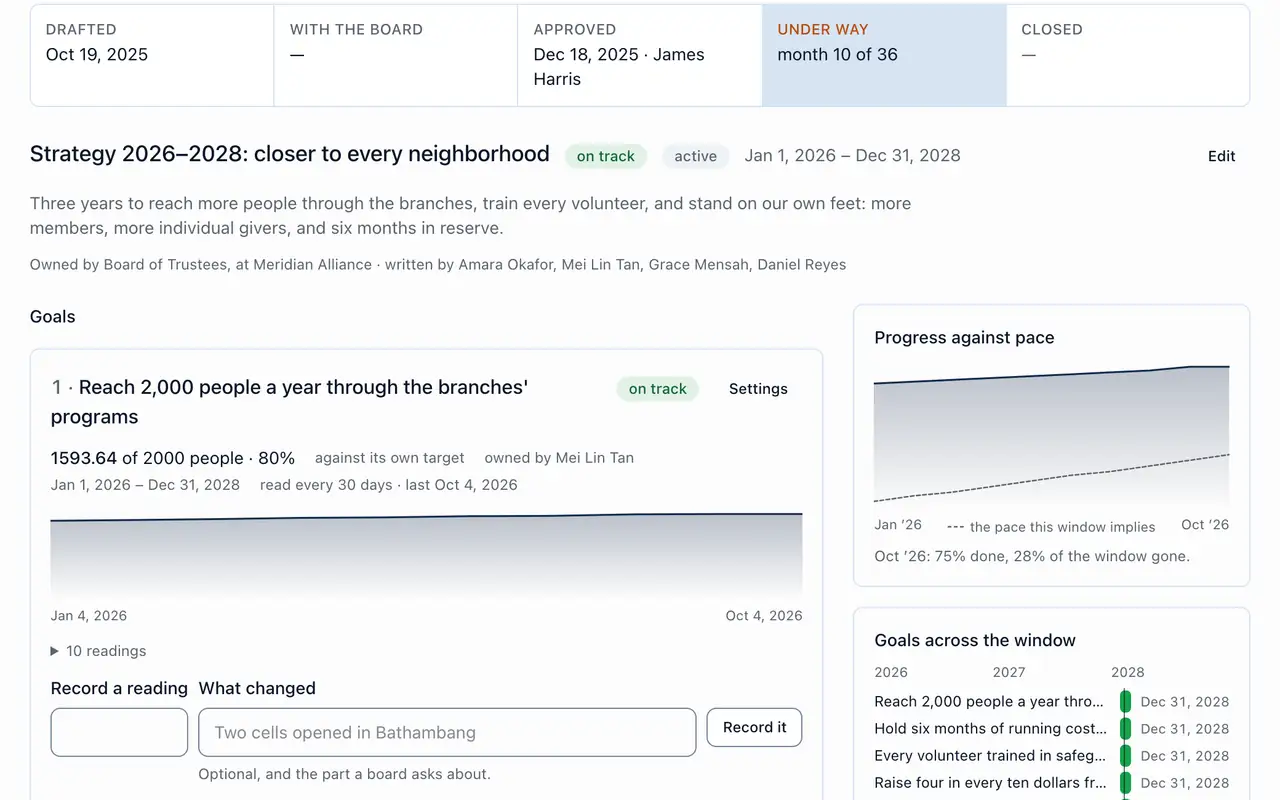
A strategic plan under way: approved by the board, each goal with its owner, its readings and progress against pace, and the goals across the plan's three years

1 of 9

Board meetings that stand up to an audit.

  • Boards and committees with terms, quorum and motions.
  • Minutes drafted for you and frozen once approved; decisions and actions registers.
  • Strategic plans whose goals link to people's reviews.
  • Written resolutions marked Ordinary, Restricted or In camera, and a register of interests.

Also in this area

  • Meetings
  • Decisions
  • Actions
  • Plans
  • Register of interests
  • Video rooms

Used by

Board members, the secretary, committee chairs and the Owner.

org-app.com/approvals
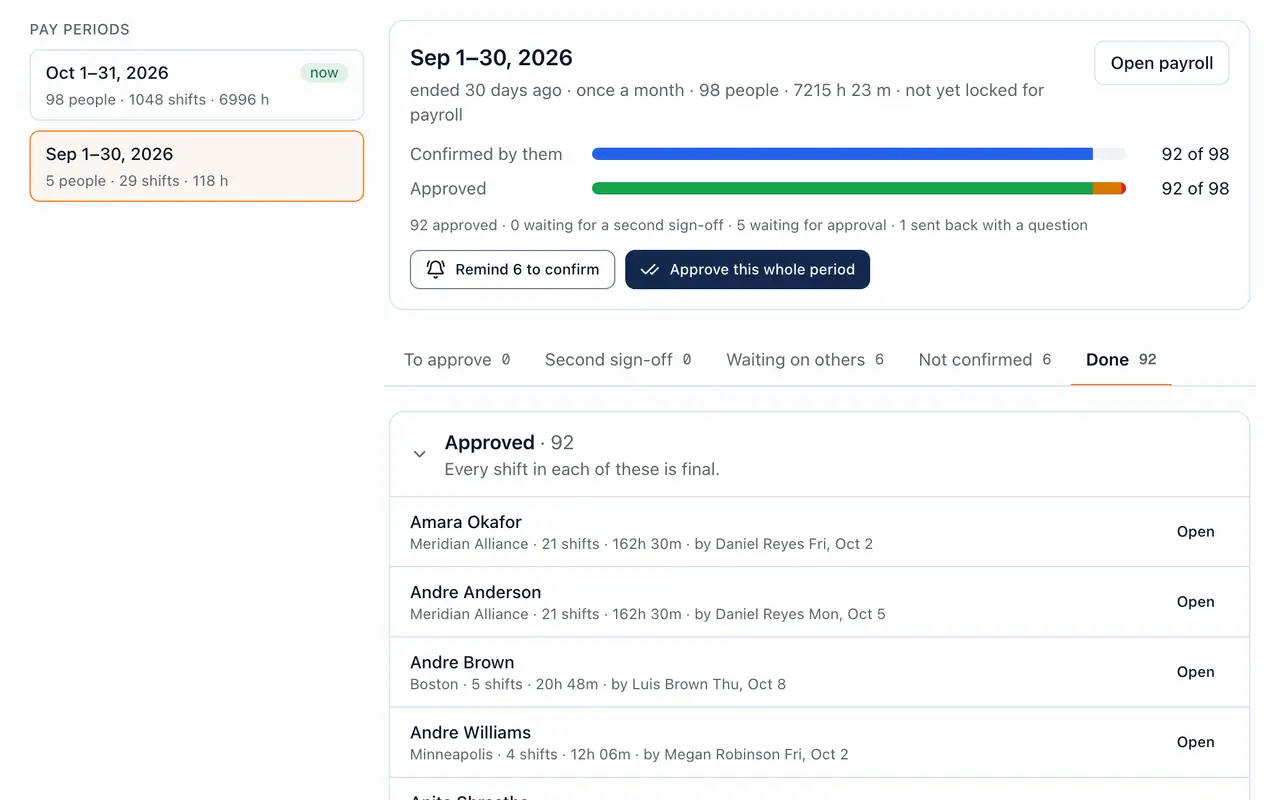
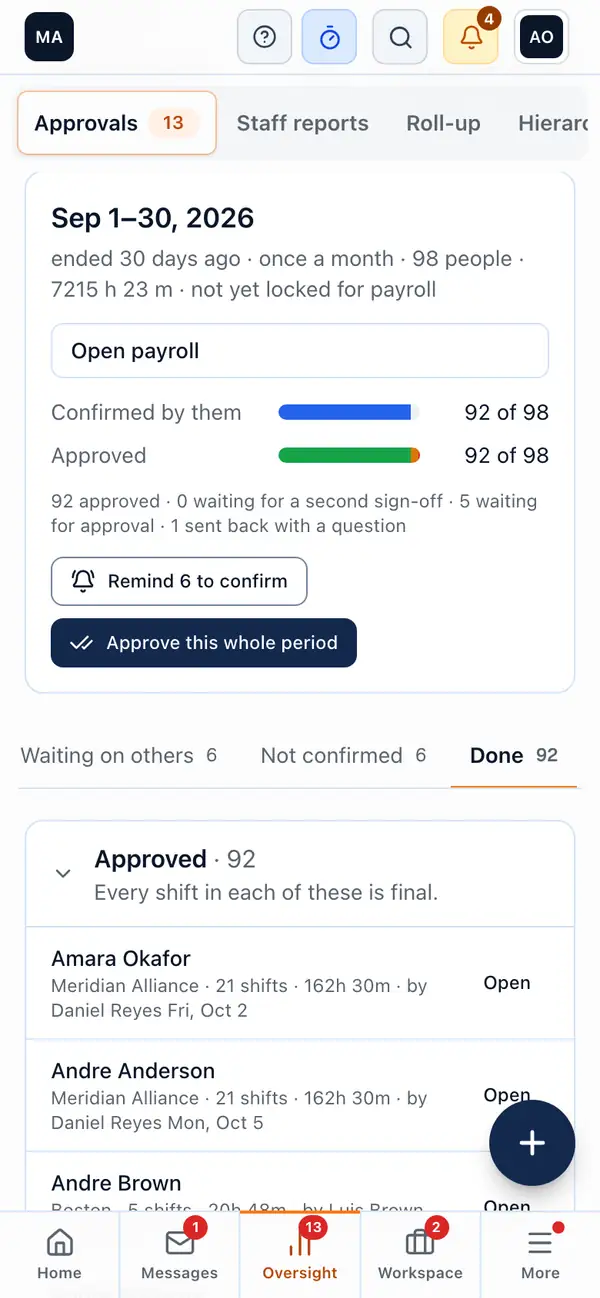
A month's pay period in Approvals: 92 of 98 people confirmed and approved, the button that approves the whole period, and the people whose timesheets are done

2 of 9

From the first clock-in to the payslip.

  • Clock in on a phone even with no signal, or with an ID card at a door tablet that keeps its scans through a dropped connection when no PIN is asked.
  • Shift rosters that won't publish a shift on approved leave, a double booking or too little rest.
  • Approve a whole pay period in one pass, with a second sign-off where you want one.
  • Pay runs and payslips from approved hours, approved by someone who isn't paid in that run, or a clean Excel file for your payroll provider.

Also in this area

  • Leave & accrual
  • Overtime
  • Attendance
  • Shift rosters
  • Volunteer rotas
  • Payslips

Used by

Every employee and volunteer on the phone; unit leads approving; HR and finance closing the period.

org-app.com/finance/overview
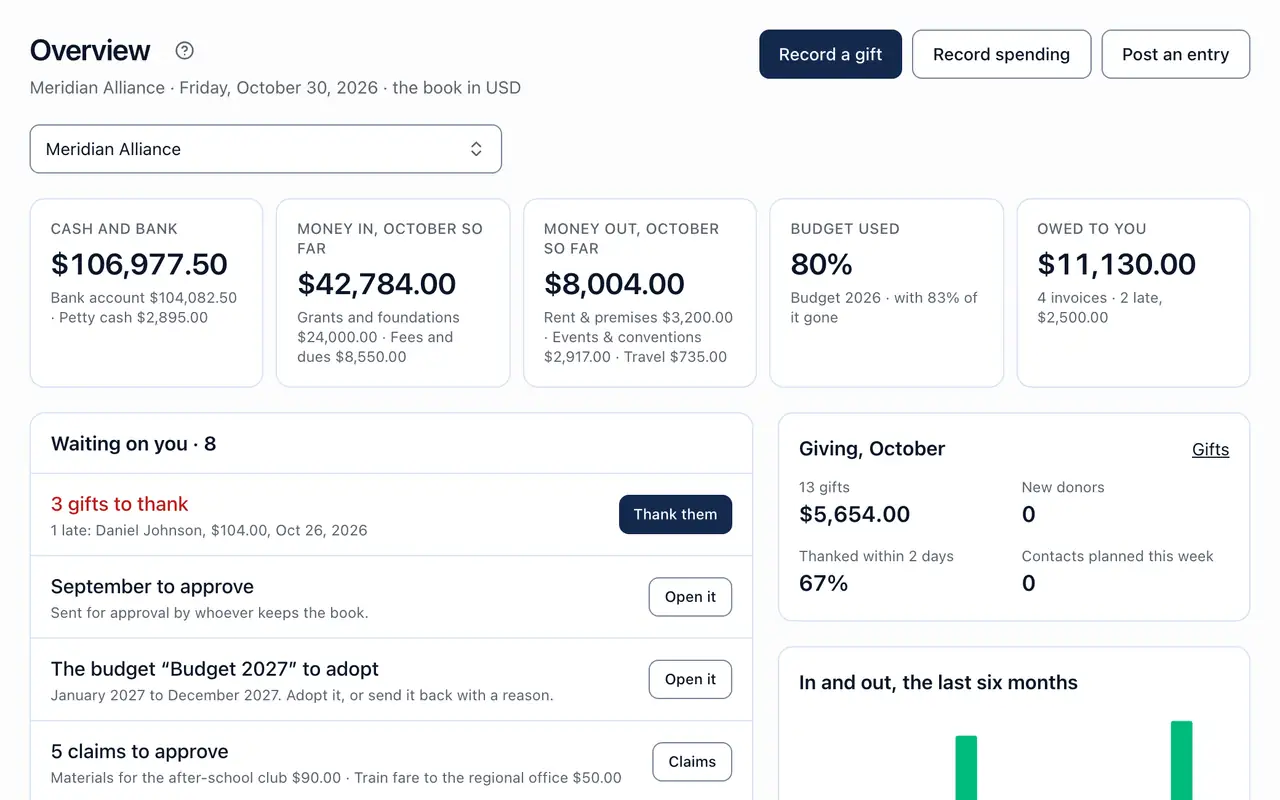
The finance overview: cash and bank, money in and out this month, the budget used, what customers owe, the eight things waiting on the Owner, giving this month and six months of money in and out

3 of 9

Proper books for every unit, added up for head office.

  • Double-entry books for each unit in its own currency, with funds and a monthly close that goes up the tree.
  • Upload a bank statement and confirm the matches it suggests.
  • Suppliers and bills, budgets with variance, and expense claims with receipt photos, posted only when approved.
  • The journal downloads in QuickBooks' own columns, or as Excel, for your accountant.

Also in this area

  • Chart of accounts
  • Bank matching
  • Invoices
  • Bills
  • Purchase orders
  • Budgets
  • Expense claims
  • Giving
  • Levies

Used by

Finance officers and bookkeepers; coordinators who keep a unit's book; the board reading the month.

org-app.com/approvals
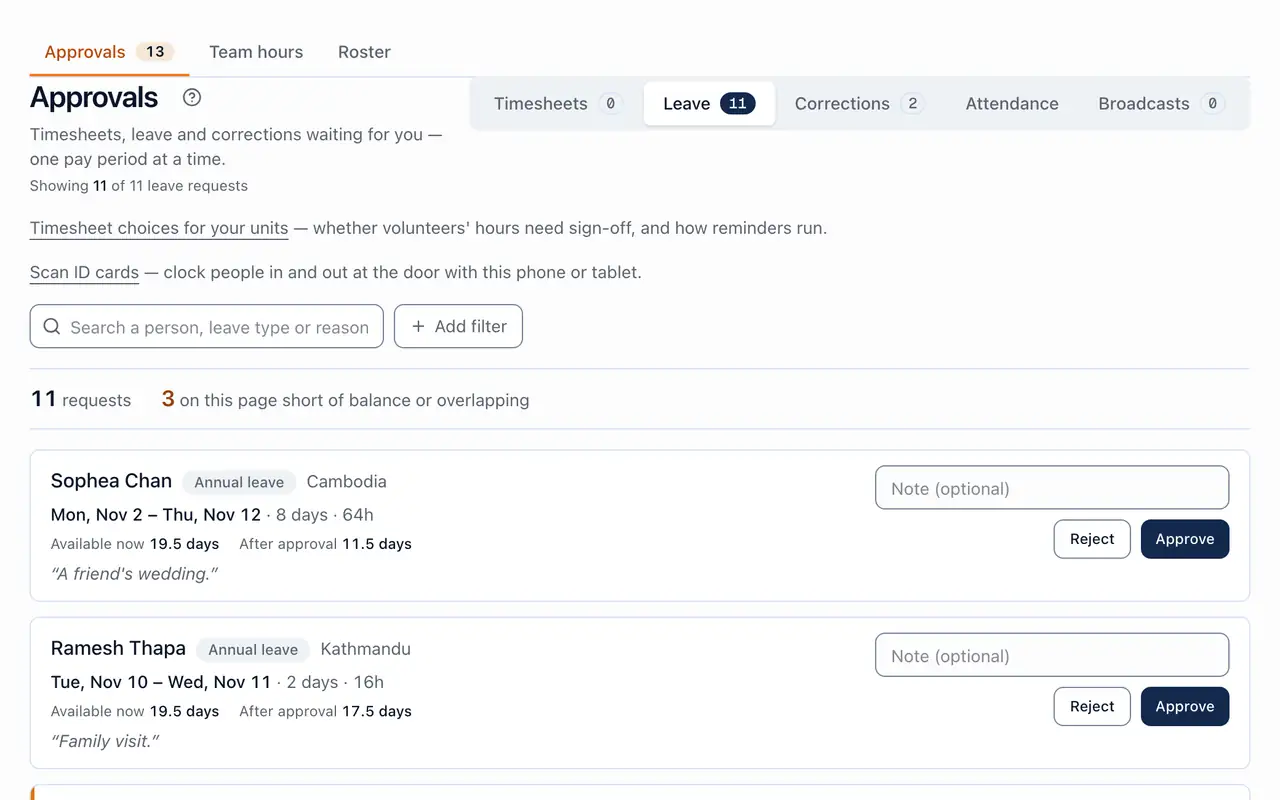
Approvals with leave chosen beside timesheets, corrections, attendance and broadcasts: eleven requests, each with the days asked for, the balance now and after, and Approve or Reject

4 of 9

Everything waiting on you, in one place.

  • Timesheets, leave, corrections, attendance and broadcasts in one queue, one pay period at a time.
  • Nobody approves their own time; reminders after 3 days and escalation after 7.
  • The dashboard opens on what needs you: units with nobody accountable, shifts never closed, months not closed.
  • A new bank account, a big raise or a dismissal waits for a second person, and the record says who decided.

Also in this area

  • Second sign-off
  • Escalation
  • Needs you
  • Audit log

Used by

Unit leads, coordinators, HR, finance and the Owner.

org-app.com/tasks
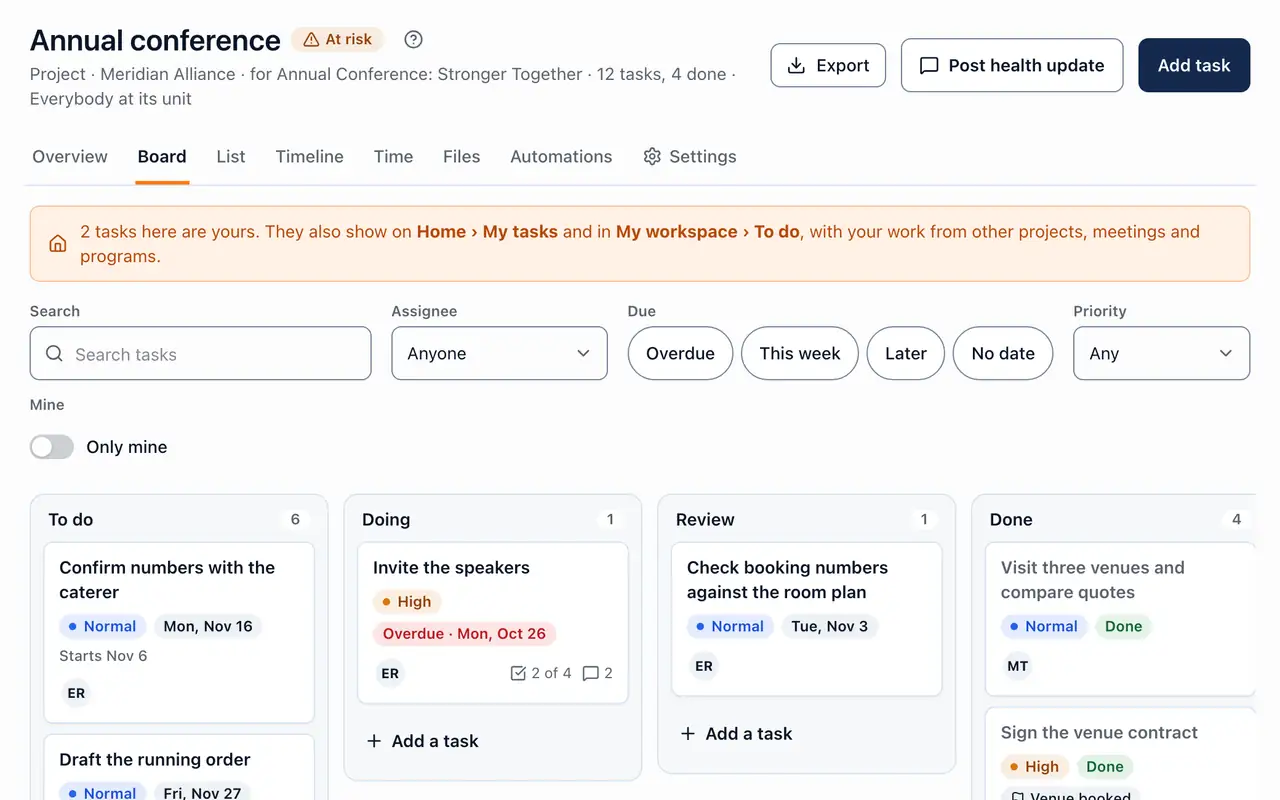
A project's board: the annual conference's tasks in To do, Doing, Review and Done, each with its priority, due date and who has it

5 of 9

Projects for every unit, and a clear view of who's overloaded.

  • Boards and lists with your own columns, checklists, comments and files from Drive.
  • Templates, a workload view, time on tasks and simple automations.
  • Link a task to a program, a meeting, a class or a person; My tasks sits on everyone's Home.
  • Forms and surveys whose answers can open a task, ask for an approval or send a notice.

Also in this area

  • Templates
  • Workload
  • Timeline
  • Automations
  • Sales pipeline
  • Forms & surveys
  • Drive

Used by

Project managers, unit teams, and anyone given a task.

org-app.com/programmes
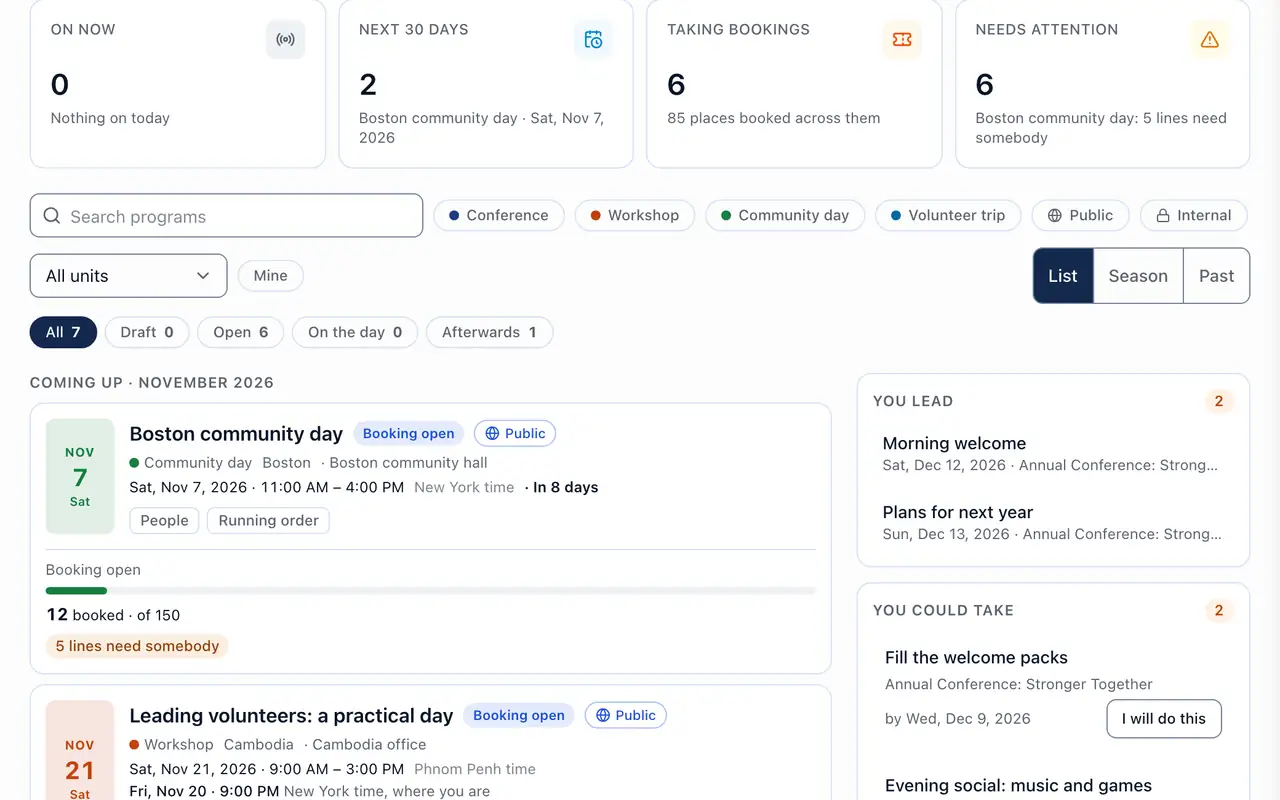
Programs: what is coming up and taking bookings, each dated with its places booked, and the lines that still need somebody

6 of 9

From the booking form to the run sheet.

  • Booking forms with your own questions, tickets with early-bird prices, and a waitlist that offers freed places in order.
  • Check-in at the door with passes and badges, and rooms for residential programs.
  • Run sheets you can share, and resources booked without clashes.
  • Follow-up afterwards: who came, who to call, and what happens next.

Also in this area

  • Calendar & events
  • Follow-up
  • Resources
  • Accommodation
  • Posters

Used by

Program managers, unit teams, volunteers on the door, and the people who book.

org-app.com/training/compliance
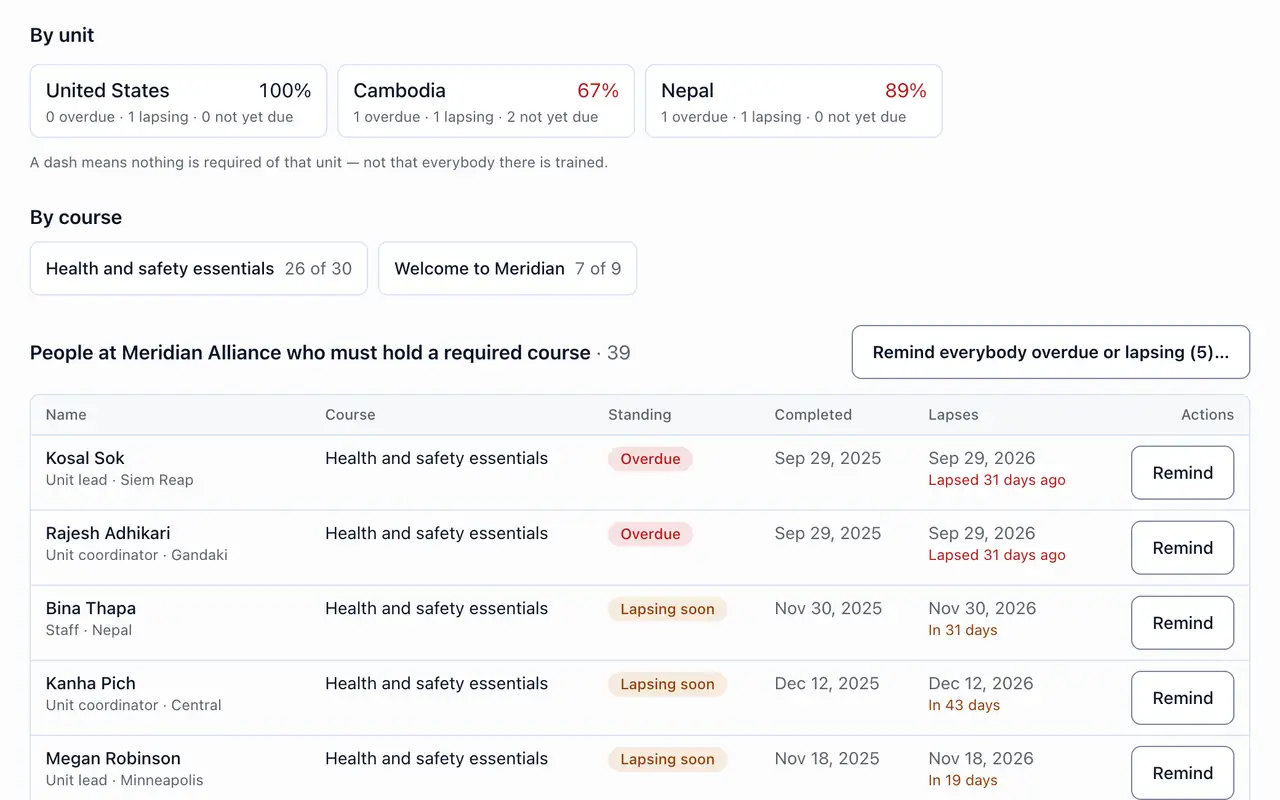
Compliance: who holds the courses their unit requires, by unit and by course, and each person overdue or lapsing soon, with a button to remind them

7 of 9

Build a course once. Every unit runs its own classes.

  • Courses with sessions, quizzes, scoring and certificates anyone can verify.
  • Required courses by role, and who is current, lapsing in the next 60 days, or overdue.
  • Classes with registers, waiting lists, paid places and a joining form.
  • Learners from outside your organization join by link, with their own My learning.

Also in this area

  • Classes
  • Certificates
  • Learning paths
  • Self-paced
  • Joining form

Used by

Course leads and facilitators, HR for compliance, and every learner.

org-app.com/hr
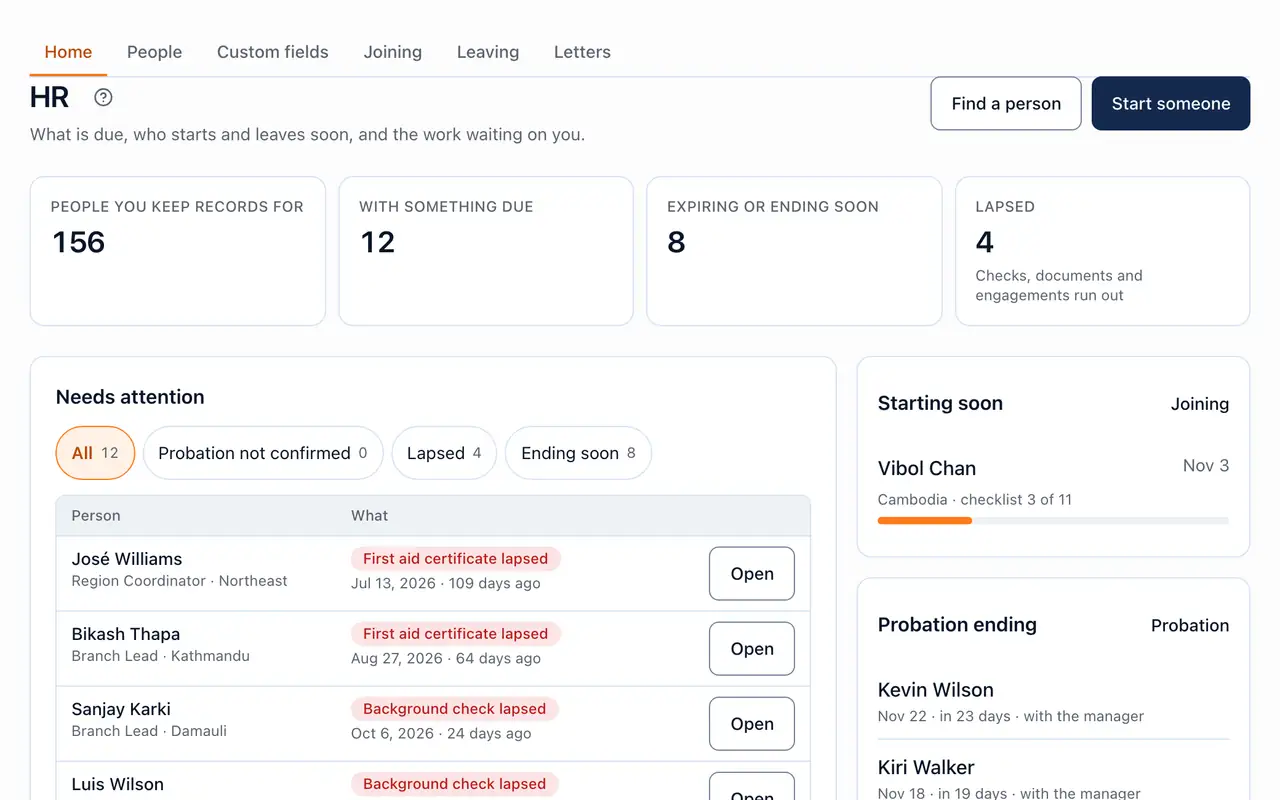
HR in the Meridian Alliance demo: how many people have something due or ending soon, who needs attention (a lapsed first aid certificate, a background check lapsed), who starts soon and whose probation ends

8 of 9

Every person's record, from the offer letter to the last day.

  • An HR record for everyone: employment, documents, checks with expiry dates, emergency contacts and your own fields.
  • Joining and leaving checklists that start themselves; the manager recommends at probation and HR records it, while an extension, a fail or a termination is decided by someone above.
  • Hiring from a budgeted position: a job page, fair interview panels, an offer signed off by a second person, and the hire seats them.
  • Letters signed in the app, and disciplinary and grievance cases with named roles and appeals.

Also in this area

  • Org chart
  • Hiring
  • Onboarding
  • Probation & exits
  • Reviews & 1:1s
  • Letters & e-signature
  • Cases

Used by

HR administrators, managers who decide above their teams, and the Owner.

org-app.com/hr/org-chart
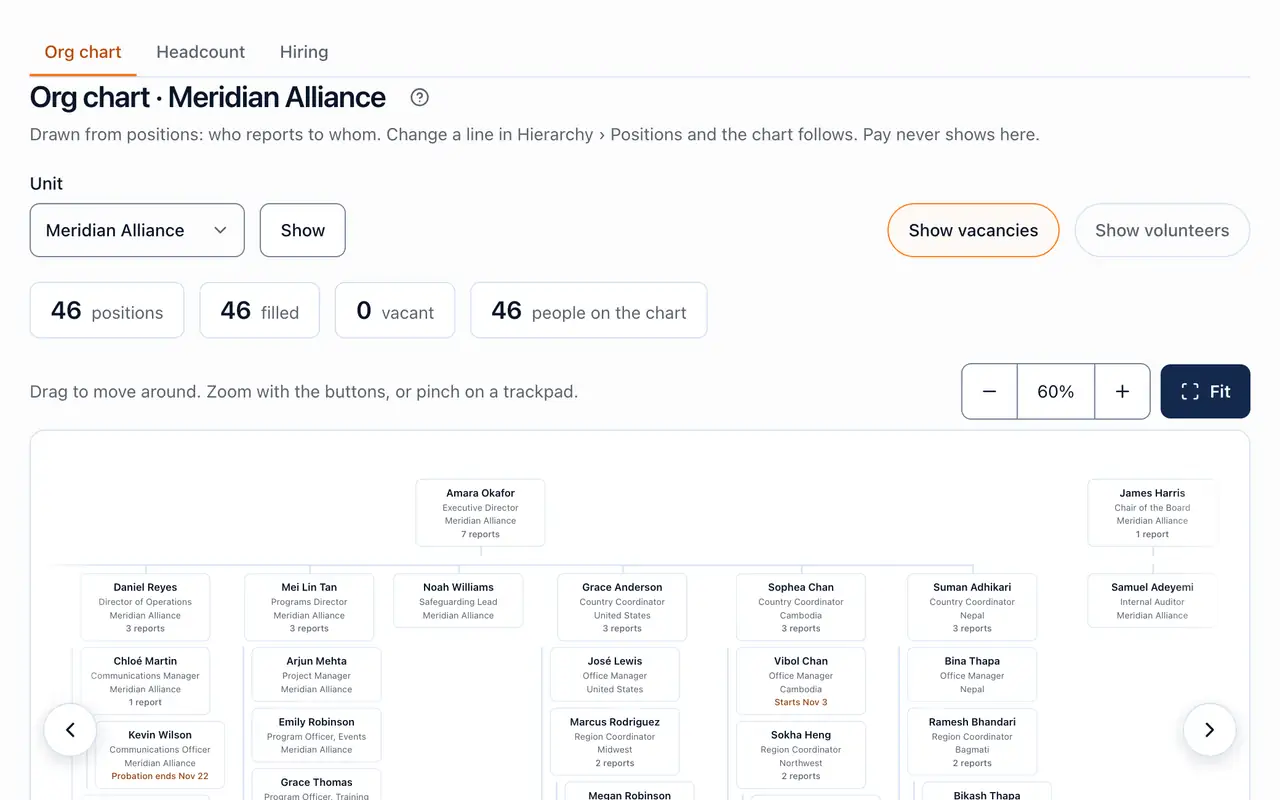
The org chart: positions filled and vacant, and the chart zoomed in with its buttons, who reports to whom from the director down, each box a position and the person in it
org-app.com/hr/reviews
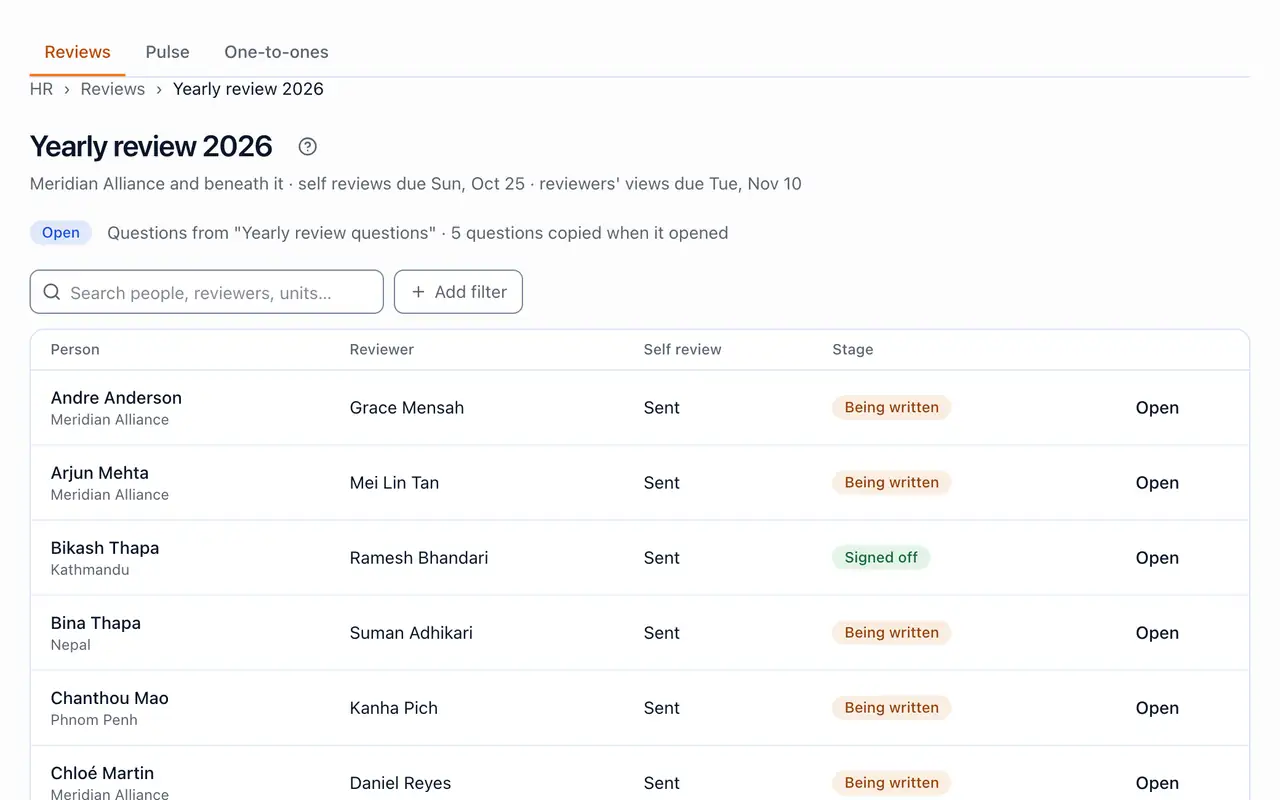
A yearly review cycle under way: each person, their reviewer, whether their self review was sent, and the stage, from being written to signed off

9 of 9

Reviews people trust, and goals that point the same way.

  • Review cycles with self, manager and peer views, signed off and then locked.
  • Appeals answered by someone other than the reviewer.
  • Goals linked to the strategic plan, and private 1:1 notes.
  • Anonymous pulse surveys, shown only in groups of five or more.

Also in this area

  • Review cycles
  • Goals
  • 1:1s
  • Pulse surveys

Used by

Managers, HR administrators, and every person reviewed.

Units

Settings flow down. Numbers flow up.

  1. 1Set it once at the top. Overtime rules, leave policies, holidays and payment routes are inherited by every unit beneath, and any unit can set its own.
  2. 2Each unit runs its own. Its own books and currency, its own time zone, its own people, and its own leader approving their work.
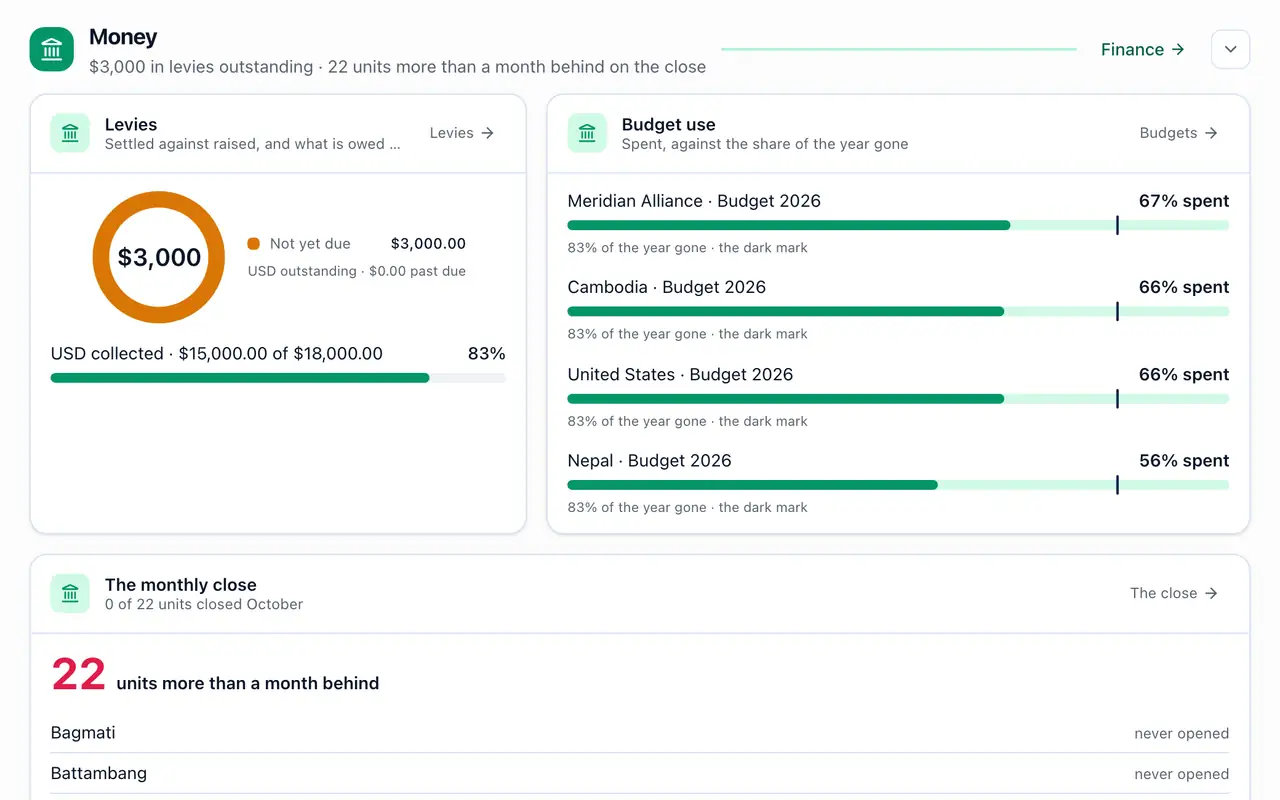
  3. 3Head office sees it added up. Budgets by country, the monthly close unit by unit, hours, reports and compliance, without asking anyone for a spreadsheet.
org-app.com/dashboard
Head office's dashboard, added up across Meridian Alliance's units: levies collected, each country's budget against the share of the year gone, and which units are behind on their monthly close

Made for every role

Everyone opens to their own Home, and sees only what their job needs.

Every role was checked page by page: what it sees, what it can change, and what it can never touch.

Choose a role

The whole organization, and what needs a decision.

  • Opens on the numbers for every unit, and the few things only they can decide.
  • Sets up units, roles and modules; the only one who can loosen sign-in or lift a name boundary.
  • Confirms it's them before changing where money goes.
org-app.com/dashboard
The Owner's dashboard in the Meridian Alliance demo: what needs them, worst first (a unit with nobody accountable, shifts never closed, units behind on their monthly close, shifts waiting on sign-off, a purchase order waiting for approval), and the month's figures

People records, hiring and reviews for the units they look after.

  • Joining and leaving checklists, probation and exits.
  • Review cycles, hiring panels, letters and cases.
  • Seats and offboards staff and volunteers, never more than their own keys allow.
org-app.com/hr
HR in the Meridian Alliance demo: how many people have something due or ending soon, who needs attention (a lapsed first aid certificate, a background check lapsed), who starts soon and whose probation ends

The unit's books, bank and bills.

  • Posts entries, matches the bank statement and pays approved claims.
  • Records a leaver's settlement as paid.
  • Proposes payment routes for an Owner or an Admin to approve.
org-app.com/finance
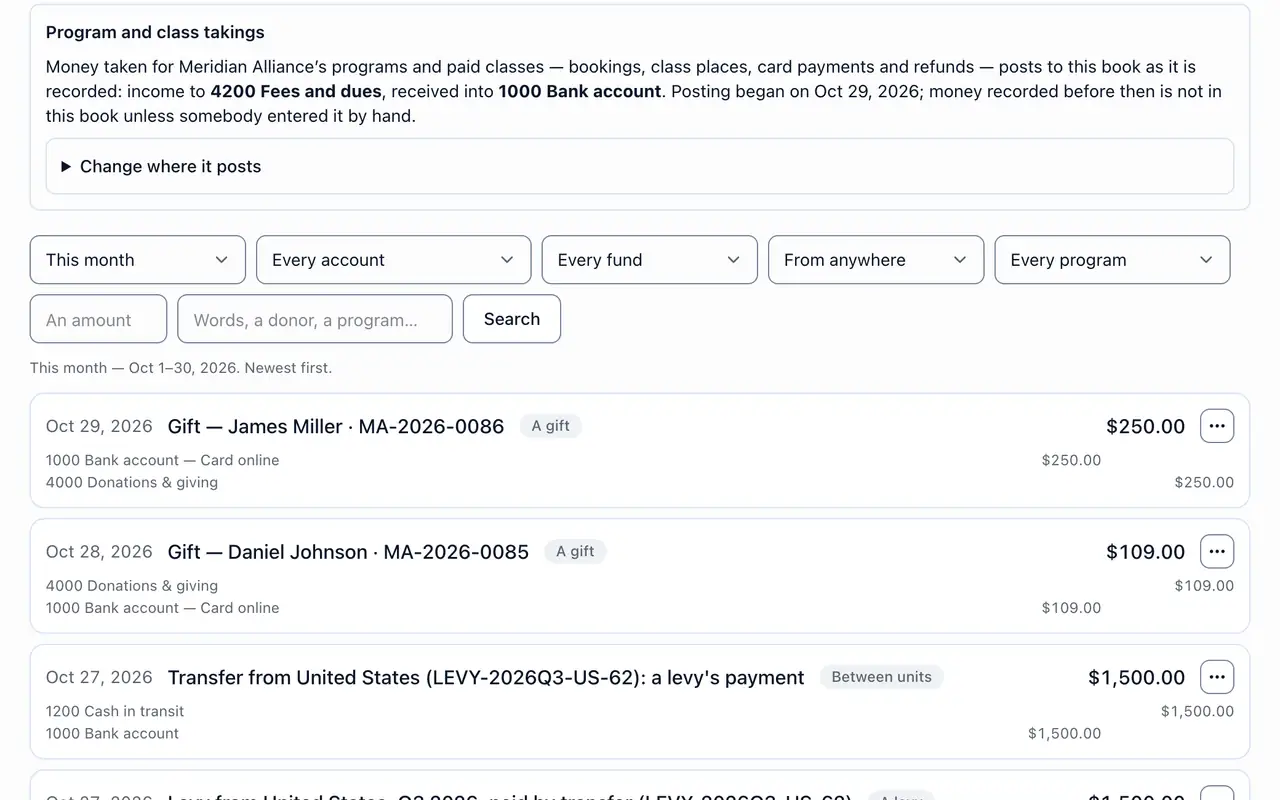
The journal of a unit's book: how program and class takings post to it, its filters, and each entry (gifts, a levy paid between units) with the accounts it posted to

Projects, workload and templates.

  • Runs projects for their units as boards or lists.
  • Sees who is overloaded before giving out more.
  • Saves a project as a template for the next one.
org-app.com/tasks
A project's board: the annual conference's tasks in To do, Doing, Review and Done, each with its priority, due date and who has it

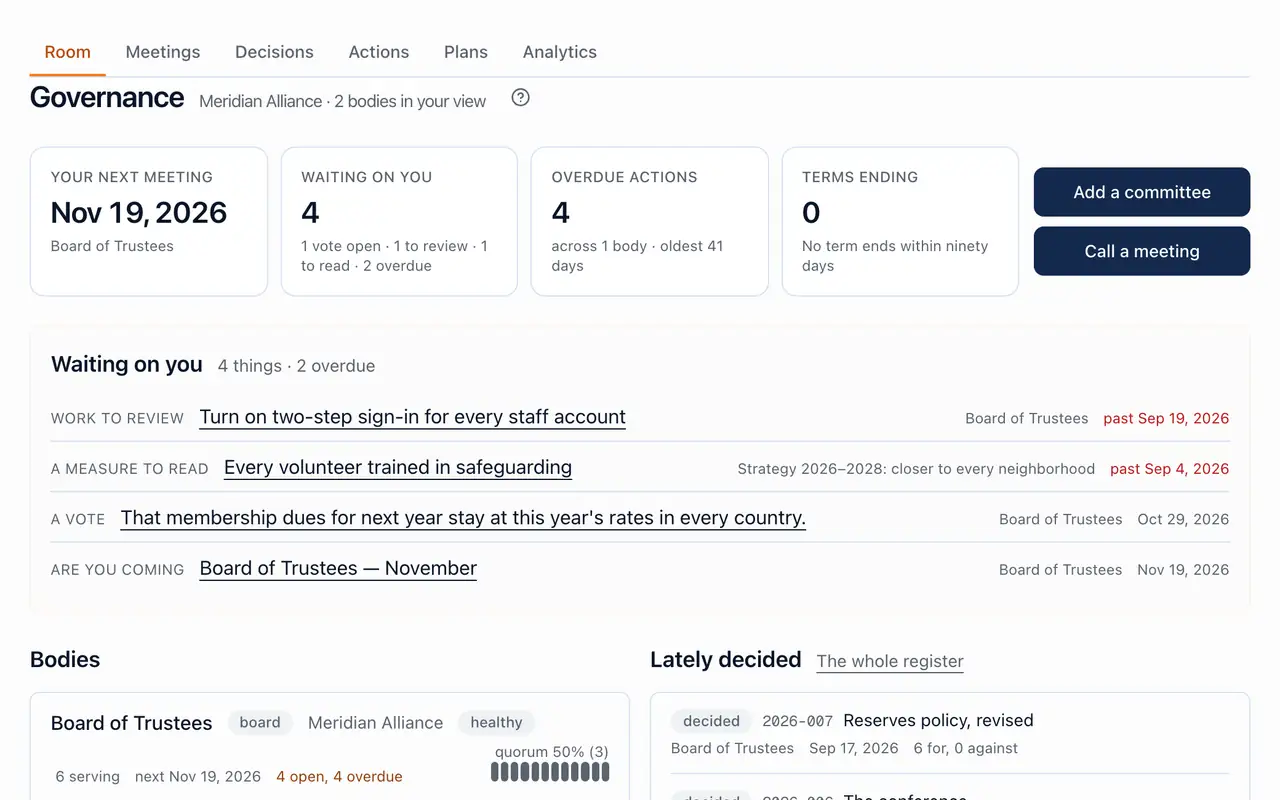
Board papers, decisions and the month's numbers.

  • Meetings, motions, minutes and the actions register.
  • Reads the month's books and sends a month back for correction while it waits for approval.
  • Sees restricted resolutions only where they serve.
org-app.com/governance
The governance room as a board member reads it: the next meeting, what is waiting on them, the boards and committees, and what was lately decided

Their own day, on the phone.

  • Clocks in, sees their timesheet and asks for leave.
  • Their own courses and compliance row, nobody else's.
  • Messages, the noticeboard and their tasks.
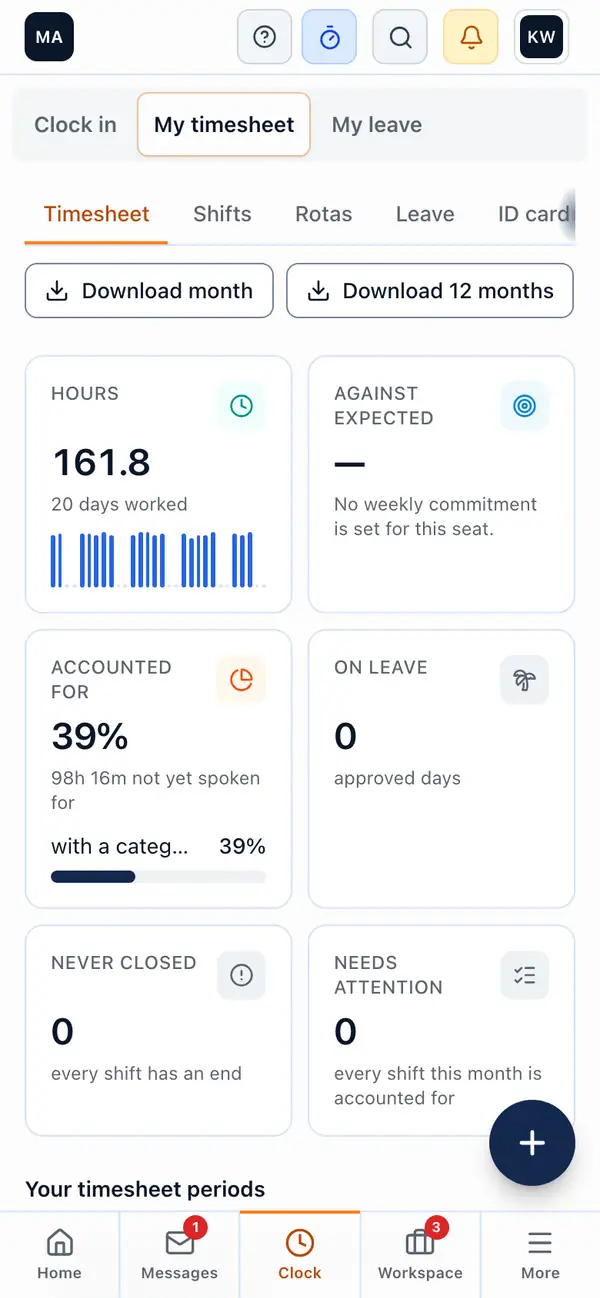
My timesheet on a phone: clock in, the timesheet and leave, the month's hours day by day, and what is still to account for

Reads the books and decisions. Changes nothing.

  • Read-only by every door: no buttons that the server would refuse.
  • The book, the reports and the board's decisions.
  • No events, rosters or people's private details.
org-app.com/finance/reports
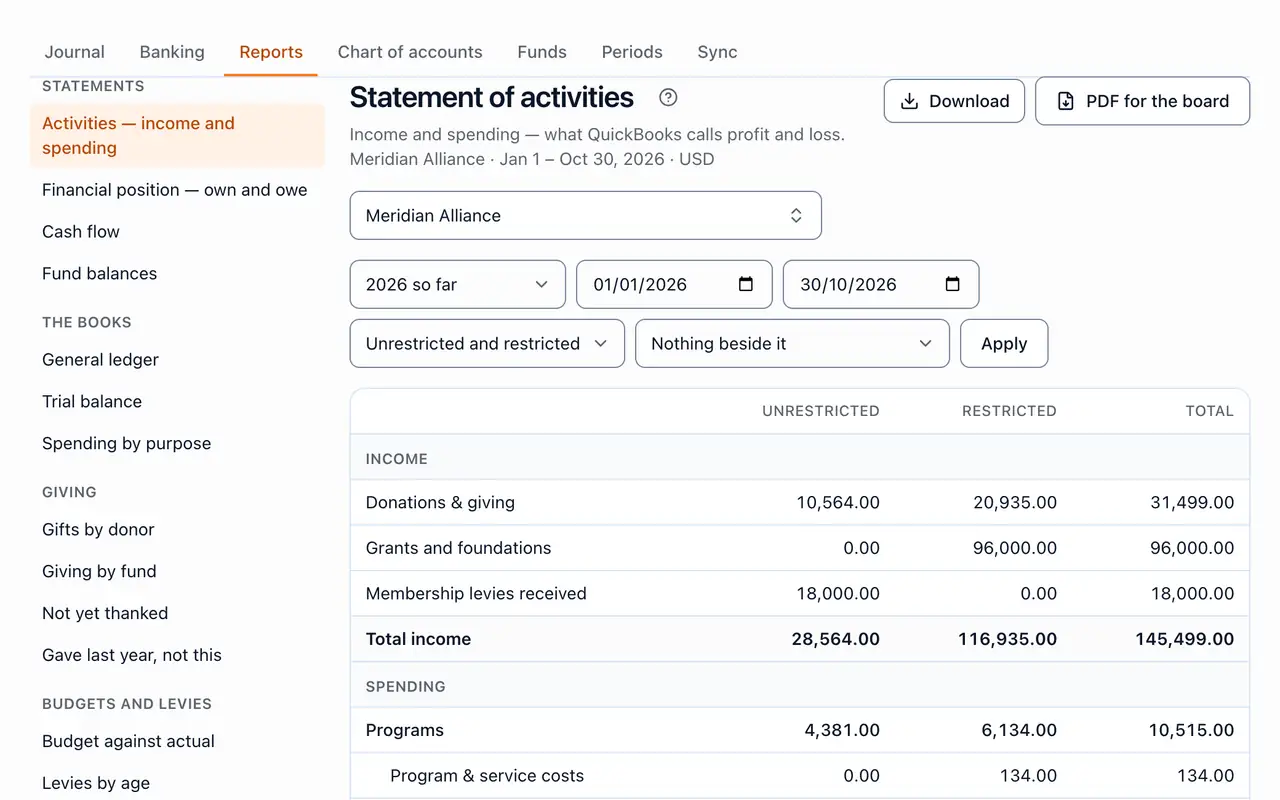
The statement of activities as the Auditor reads it: income and spending this year, unrestricted and restricted, with every report beside it and nothing to change

Security and your data

Built for the records you're responsible for.

  • Each organization walled off

    Row-level security on every table: the database itself refuses one organization's records to another, not only the app.

  • Least privilege, checked page by page

    Every built-in role checked across every page: what it sees and what it can change. Read-only seats change nothing, by any door.

  • Two-step sign-in and “confirm it's you”

    On by default for admins; only an Owner can turn it off. Asked again before money changes route, someone gains sensitive access, or sign-in is loosened.

  • Single sign-on and SCIM

    Microsoft Entra ID, Google Workspace, Okta, or any SAML or OpenID Connect provider, with people added and removed by your directory.

  • An audit log that shows any change

    Hash-chained, sealed every 15 minutes and checked every day, so an entry changed afterwards shows.

  • Your data, yours to take

    Download an archive of your organization's records any time, and erase a person when they ask. Made by a Canadian company; the servers are in Singapore.

The legal documentsSub-processorsReport a security problemWho makes ORG-APP

On the phone

Apps for iPhone and Android are coming soon.

Until then, add ORG-APP to your home screen from the browser. It opens like an app, with nothing to download.

  • App Store · coming soon
  • Google Play · coming soon
  • Works on any phone today, from the browser: no store, no download.
  • Clock in, see the punches waiting to send, and make a claim offline; receipts go up later.
  • Approve a whole pay period from a phone, between meetings.
  • The director's Home on a phone: a greeting, what is coming up and the tabs along the bottom
  • My timesheet on a phone: clock in, the timesheet and leave, the month's hours day by day, and what is still to account for
  • Approvals on a phone: a pay period with 92 of 98 people confirmed and approved, the button that approves the whole period, and the people whose timesheets are done

Moving in

Bring your spreadsheets. Keep the tools you use.

18 imports, each with an Excel template, and connections to the systems you already work in.

Imports

  • People
  • Units
  • Contacts
  • Pay records
  • Leave balances
  • Past hours
  • Training records
  • Registrations
  • Past participants
  • Payments
  • Donors
  • Gifts
  • Chart of accounts
  • Budgets
  • Holidays
  • Resources
  • Bank statements
  • Daily notes

Connects to

  • Microsoft Entra ID
  • Okta
  • Slack
  • Microsoft Teams
  • Stripe
  • Zeffy
  • Claude
  • ChatGPT
  • Microsoft Copilot

Give every unit its own tools. Keep one company.

Start free and switch modules on as you grow, or ask for a demo with your own organization's name on it.

Start freeRequest a demoSee plans
  • Security
  • ORG-APP by VantageTech Apps Limited · support@org-app.com

    © 2026 VantageTech Apps Limited, a federal corporation of Canada

    The org chart, drawn from positions, opens fitted to the screen and zooms and pans.